
One module, three products: sharing stock across bundle variants
Modular products often reuse the same core piece across otherwise unrelated products. Stocking that piece separately for every product it appears in splits one physical stock pool into several artificial ones. Here's how a shared component in Ricemill | Inventory keeps it as one pool instead.
The use case: one module, three very different products
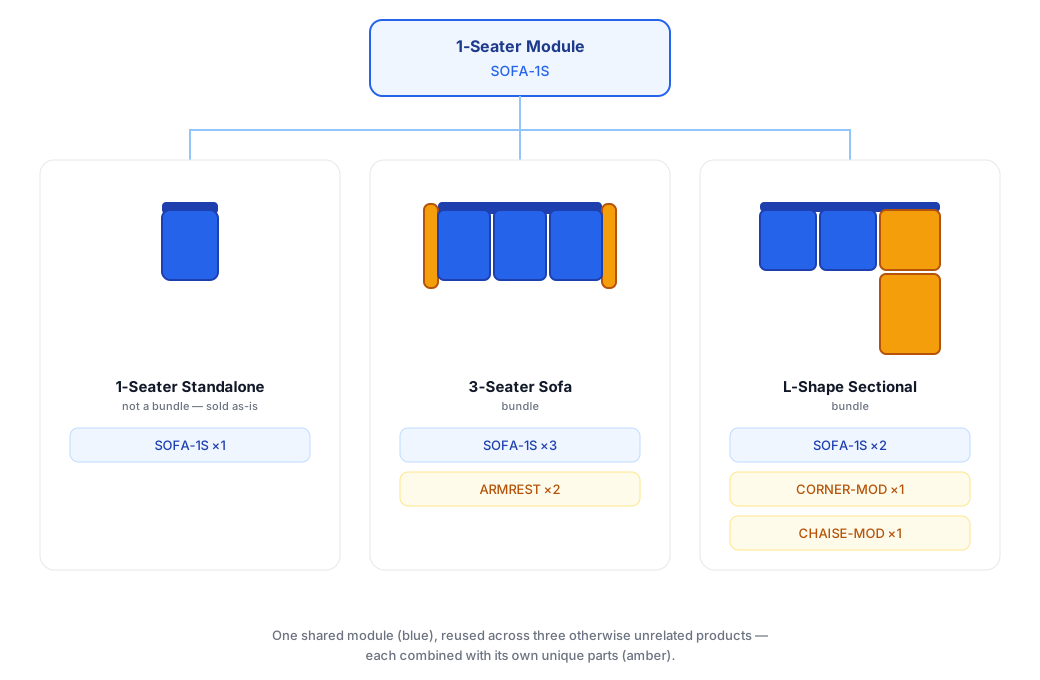
A furniture store sells a modular sofa system built around a single 1-seater module (SKU SOFA-1S). That one module, combined with different accessory pieces, becomes three products that don't even look related on the showroom floor or the website:
- The 1-Seater Standalone. Just the module on its own, sold as an accent or armless chair.
- The 3-Seater Sofa. Three 1-seater modules latched together in a row, capped with a pair of detachable armrests.
- The L-Shape Sectional. Two 1-seater modules combined with a corner module and a chaise lounge.
The armrests, corner module and chaise are each unique to their product. The 1-seater module is not: it's the one piece that appears in all three. Stocking it as three separate, unrelated line items, one per finished product, is tempting but wrong. It's still the same physical module coming off the same production run. Splitting it into separate pools per product means overordering for the sectional while running short for the standalone chair, and reconciling counts by hand every time stock moves.
The solution: a shared component, not a shared guess
In Ricemill | Inventory, a bundle's components are references to items already in your inventory, added by searching their SKU or name. Because a component is a reference and not its own stock record, the same inventory item, in this case the sellable 1-Seater Standalone itself, can be linked into as many bundles as you like, each alongside whatever other components make that product unique.
So the 1-seater module (SKU SOFA-1S) gets stocked once, sold on its own as a standalone product, and reused as a component in bundles that don't otherwise resemble each other:
| Product | Components |
|---|---|
| 1-Seater Standalone | Sold as-is, not a bundle |
| 3-Seater Sofa | SOFA-1S ×3, ARMREST ×2 |
| L-Shape Sectional | SOFA-1S ×2, CORNER-MOD ×1, CHAISE-MOD ×1 |
The Standalone row isn't a bundle at all, it's SOFA-1S sold as a plain inventory item. The other two are bundles that happen to include SOFA-1S as one of their components. One SKU, one count, reused wherever it's needed, alongside the parts that make each product distinct.
How buildable quantity keeps everyone honest
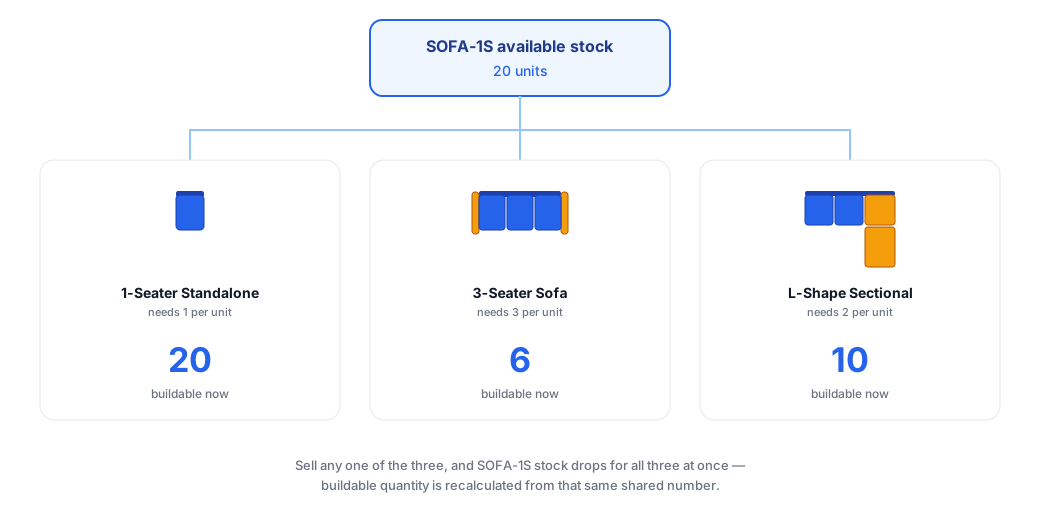
Each bundle shows a Buildable Quantity, worked out from the current available quantity of all its components, shared or unique, not a fixed allocation reserved to one bundle. With 20 units of SOFA-1S on hand, the 3-Seater Sofa can build up to 6 (limited by needing 3 modules each), and the L-Shape Sectional can build up to 10 (limited by needing 2 modules each), assuming armrests, corner modules and chaises aren't the tighter constraint. Meanwhile, all 20 SOFA-1S units are still sellable as standalone chairs until something claims them.
Sell (or adjust) stock against any one of the three products and SOFA-1S's available quantity changes. The next time you check any of the others, their buildable quantity is worked out from that same, current stock, not from a separate count of its own. There's nothing to manually reconcile, because there's only ever one number to look at.
Setting it up
- Stock the 1-Seater module as a normal inventory item (SKU SOFA-1S), sold as its own standalone product.
- Stock the unique parts too: ARMREST, CORNER-MOD, CHAISE-MOD.
- Create (or convert) the 3-Seater Sofa as a bundle. Under Components, search for SOFA-1S and set its quantity to 3, then add ARMREST at quantity 2.
- Create (or convert) the L-Shape Sectional as a bundle. Add SOFA-1S at quantity 2, then add CORNER-MOD and CHAISE-MOD at quantity 1 each.
- Leave the 1-Seater Standalone as a simple product, no bundle needed, it's just SOFA-1S itself.
- Check Buildable Quantity on the 3-Seater Sofa and L-Shape Sectional: both reflect the shared SOFA-1S pool, so any change to SOFA-1S's stock shows up on every product that uses it, next time you check.
Why this matters
- One count, not three. You stock and count the shared module once, not once per finished product.
- Bundles don't have to look alike. A shared component can sit inside completely different products, mixed freely with parts that are unique to each.
- No artificial shortages. Buildable quantity always reflects real, current stock, not a guess split across products.
- Scales with the range. Add a fourth or fifth product built from the same module without touching how the existing ones are stocked.
Give it a try
Install Ricemill | Inventory today, then set up your shared module as a standalone product and add it as a component to whichever other bundles reuse it, alongside their own unique parts. Watch the buildable quantity on every product move together as stock changes, instead of managing separate counts by hand.