Shipments, Pick & Pack Workflow Overview
Last updated: April 19th, 2024
In this article:
Shipments, Pick & Pack Workflow Overview
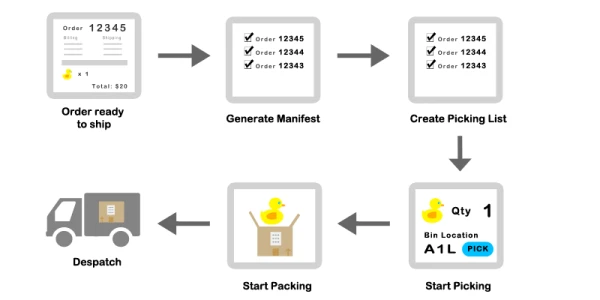
Step 1: Verify Sales Orders
- Verify your sales that have issues.
Step 2: Create Shipments
- Go to Pick & Pack > Shipments > Create New
- Select the order you are want to ship.
- Verify the order details, notes.
- If everything ok, create Manifest.
- Print Packing Slip
How to generate a new shipments?
**Step 3: Create a Picking List **
- After you had created new shipments, you can generate a picking list to start picking items in the orders.
- Go to Pick & Pack > Picking > Create New.
- Select the orders you want to pick and create picking list.
Step 4: Packing
- Once picking process is done, you can start packing orders.
- Go to Pick & Pack > Packing.
- Scan the barcode on the Packing Slip to start packing.
- Verify the items in the orders.
- Record Tracking number.
Step 5: Dispatch
- Once you had done the packing, go to Pick & Pack > Dispatch.
- Select the order to dispatch.