Duplicate Order
Last updated: March 19th, 2026
How to Resend an Order or Create a Replacement Using a Duplicate Order
Available on paid plans only
You cannot recreate a label from a completed order. To resend or replace an order, use the Duplicate Order function to create a duplicate order and generate a new shipping label from it.
Please make sure to review and update the shipping address to the new address in new manual order.
Steps:
- Open the order you want to resend.
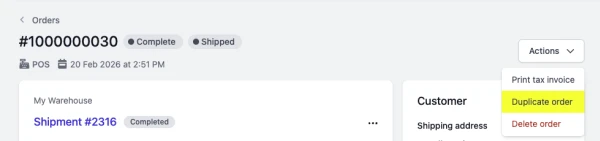
- Click Actions → Duplicate Order. This will create a new manual order based on the original. (You will need to update the shipping address in the next step.)
- Review the order details (e.g shipping address) and click Create Order to confirm.
- Fulfil the new order as usual.
Please note: This duplicate order will not be linked to or synced with Shopify. You will need to manually copy the tracking number to Shopify.